
A super simple way to create an AI-powered virtual presenter video using D-ID
Reading time: 5 minutes
D-ID provides an AI platform that enables the creation of virtual presenters capable of speaking just like real people. By leveraging deepfake and AI video technologies, the platform generates videos featuring virtual presenters who articulate the specific text content you provide. This flexibility allows you to create engaging virtual presenters, making it easier to convey your message effectively.
Notably, the technology allows users to customize the presenter’s identity, gender, age, and even language, voice, and intonation, fostering a sense of inclusivity and familiarity. Furthermore, the application helps boost customer engagement for businesses that utilize D-ID to produce their videos.
Vietnam’s leading AI-powered multi-channel virtual call center solution
To better understand D-ID’s features and learn how to create AI-powered virtual presenter videos using the platform, take a look at the article below!
How to Create an AI-Powered Virtual Presenter Video with D-ID

Key features of D-ID:
- High-definition “Premium” presenters featuring lifelike body and facial movements, including hand gestures;
- An option to create custom Premium presenters, requiring a short video recording of the subject;
- “Special” presenters created from any photo combined with text or audio;
- Easy, user-friendly creation of both Standard and Premium presenters with just a few simple clicks;
- Video creation in multiple languages via text translation;
- Extensive voice support across 119 languages and variants;
- Flexible audio input options: users can upload a different digital presenter and control it with a personalized voice or use voice cloning for a more specific vocal match;
- Access to an exclusive PowerPoint plug-in for direct integration into presentations, bringing text to life with presenter videos;
- API version available for enterprise users.
Steps to create a virtual MC video speaking with AI using D-ID
Step 1: Access the D-ID website: Here

Illustration of step 1
Step 2: Then, click on “CREATE VIDEO”

Illustration of step 2
Step 3: In this section, D-ID will by default provide a number of MC models for you to choose from.

Illustration of step 3
Step 4: If you want to add another face, you need to register a D-ID account. Then, click the Sign up button or log in quickly using Google.

Illustration of step 4
Step 5: Choose from a pre-made MC template or upload your own photo to create an MC.
Here, I choose a pre-made MC template and enter the content I want the MC to say. Then, I select the language: Vietnamese -> Choose a voice (Currently, there is one male and one female voice).
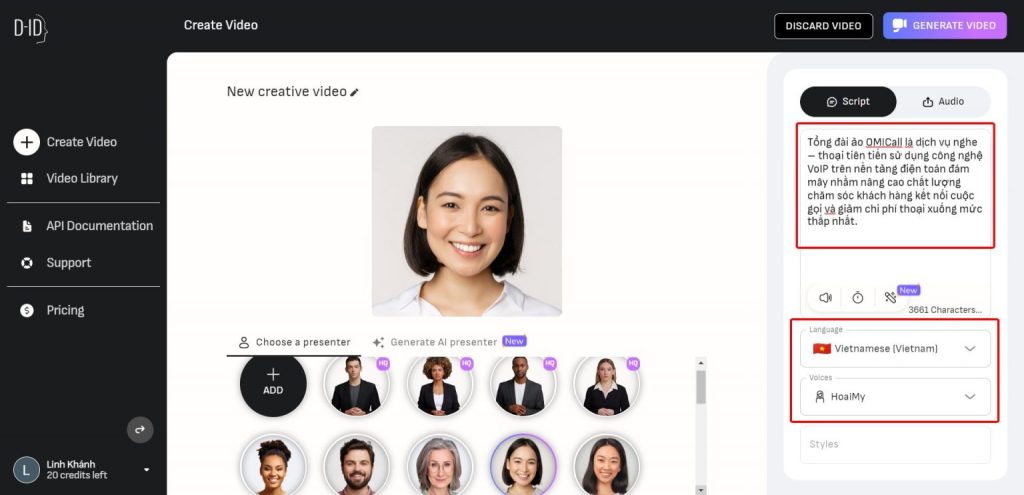
Illustration of step 5
Step 6: You can listen to sample voices of the MCs. After choosing a suitable MC, click on “GENERATE VIDEO”.
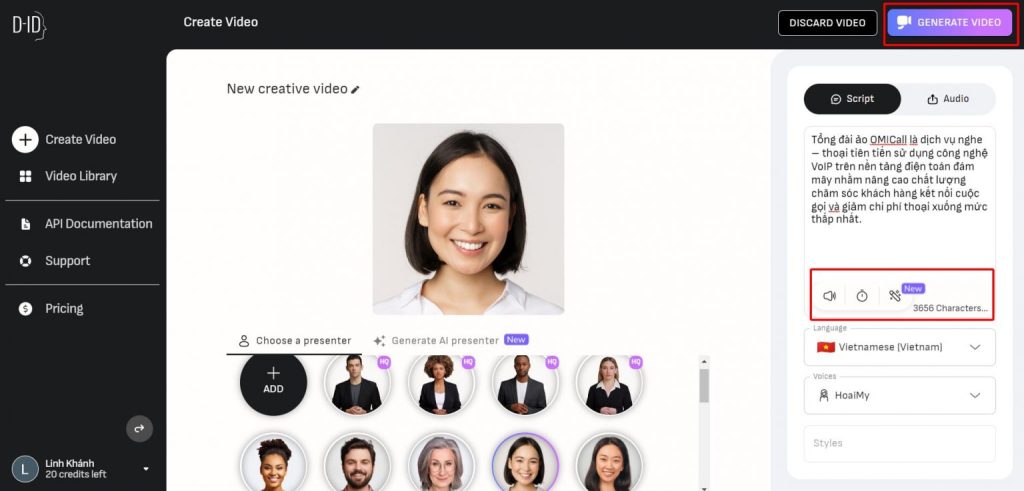
Illustration of step 6
Step 7: Next, the software will display a popup like the one below; continue by clicking “GENERATE”.

Illustration of step 7
Step 8: This is the result of the AI-powered virtual MC video speaking with D-ID.
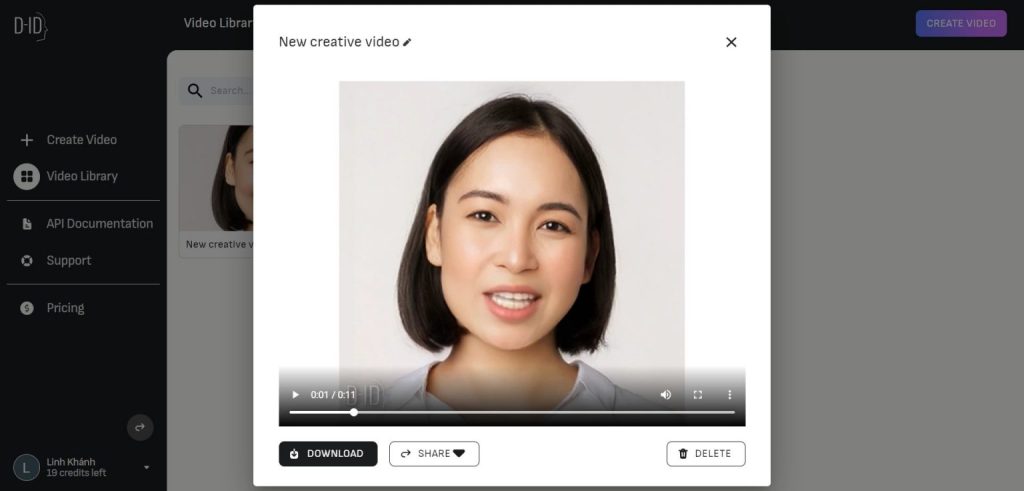
Illustration for Step 8
That concludes the guide on creating an AI-powered virtual presenter video using D-ID. If you encounter any issues while using the tool, please feel free to leave a comment below, and I will be happy to answer your questions!
CÔNG TY TNHH CÔNG NGHỆ VIHAT (VIHAT TECHNOLOGY Co.,LTD)
Trụ sở: Tòa nhà ViHAT – 06 đường số 16 (KDC Himlam) – P.Hiệp Bình Chánh – Q.Thủ Đức – TP.HCM
Chi Nhánh Hà Nội Tầng 15, Tòa Nhà LADECO, 266 Đội Cấn, Ba Đình, Hà Nội
Chi Nhánh Cambodia Thida Rath #154 St.33MC , Sangkat Steung Meanchey, Khan Mean Chey Phnom Penh

-
 What is TikTok advertising? Advertising policies and how it works.
-
 Exploring Conceptual Selling – Understanding Modern Sales Trends Correctly
-
 What is a KOC? Distinguishing between KOLs and KOCs.
-
 What Are Customer Insights? Revealing How to Effectively Uncover Them
-
 What is Digital Marketing? 10 Effective Forms of Digital Marketing
-
 What is Online Marketing? Types of Online Marketing