
What Is a Virtual PBX? Benefits and 19 Features You Need to Know
Reading time: 15 minutes
In the age of Industry 4.0, the term “virtual PBX” is no longer unfamiliar. Technologies such as VoIP, AI, Big Data, and IoT have driven major advancements in the voice communications field in general, and in customer service in particular — helping businesses cut deployment and call costs by over 80% while significantly reducing customer care response times.
Today, OMICall will cover everything you need to know about virtual PBX in the most comprehensive way possible, so that anyone reading can easily understand and apply it to their business.
What Is a Virtual PBX?
A virtual PBX is an advanced voice communication service that uses VoIP technology on a cloud computing platform to improve customer care quality, streamline call connectivity, and minimize call costs. Combined with a CRM (Customer Relationship Management) tool, it further enhances service quality and makes it easier to optimize sales conversions through calls.
Vietnam’s Leading AI-Powered Omnichannel Virtual PBX
What makes it even more special is that a cloud PBX operates on a cloud platform with IP-based connections, making installation extremely simple — all you need is an Internet connection and a few devices such as an IP phone, a desktop or laptop (calls can be made via website or softphone app), or a smartphone (with the OMICall app installed). With just an Internet connection, you can access the PBX system anytime, anywhere.
Cloud PBX has shifted the mindset of businesses away from purchasing expensive analog phone systems toward renting a PBX at a much lower cost with greater flexibility.
As a result, VoIP virtual PBX is an ideal solution for small and medium-sized businesses, or remote/online work models, that want a professional phone system capable of managing calls, sales, and customer relationships — all at a very affordable cost and without requiring a large team to operate.
Benefits of Using a Cloud PBX
Minimizing Operational Costs
- No installation fees or telecom infrastructure investment required — no messy wiring, just a computer or smartphone to get started.
- Internal calls between all branches nationwide are completely free.
- International call rates are significantly lower.
- All outbound calls are treated as on-network calls, reducing call costs by over 50% compared to conventional phone services.
- No IT staff needed to operate the system, and no equipment maintenance or repair costs.
Never Miss a Customer Call
- Traditional PBX systems are limited in the number of simultaneous calls, leading to busy signals and network congestion. With a cloud PBX, there is no limit on concurrent incoming calls, so businesses will never miss a call from a customer.
- Manage calls anytime, anywhere across multiple devices (PC, laptop, smartphone, IP phone) — simply use an internet connection (3G, 4G, or WiFi) to make and receive calls via a softphone app outside the office.
- Conveniently forward calls to a personal phone number when you are offline, have a weak connection, or no one is available on duty — making it nearly impossible to miss a customer call.
- Easily manage your telesales team, generate reports, track inbound and outbound call statistics, and replay call recordings to continuously improve service quality.
- The open PBX system makes it simple and fast to integrate additional features. The system can be relocated anywhere at no cost while retaining the same phone numbers, and issues such as power outages or cut phone lines that could disrupt call handling are greatly minimized.
Saving Operational Time
Staffing requirements are reduced since the system is fully automated and capable of placing calls to hundreds of thousands of customers simultaneously in the shortest time possible.
A built-in CRM means every call is automatically routed through the system to store information, manage interactions, and assign leads to sales staff in an instant.
Calls are handled quickly, efficiently, and accurately, with smart routing to the specific agent the customer needs — no need to go through a general support operator.
Outstanding Features of Virtual PBX Software
With its advanced technology and wide-ranging benefits, virtual PBX offers a number of breakthrough features for businesses, including:
Unlimited Extension Expansion As a business grows and opens new branches across different regions, adding more extensions is incredibly simple and low-cost — so there’s no need to worry about extra expenses or complex conditions for scaling up.
Auto-Attendant / IVR When customers call, they hear a greeting such as: “Welcome to our company. Press 1 for Sales, Press 2 for Technical Support…” The system automatically routes the call based on the customer’s input. Businesses can set up any scenario they need — connecting to an agent, transferring directly to a relevant extension, answering FAQs, and more — making customer care more proactive and professional than ever.
Music on Hold Instead of boring beeping tones, customers hear pre-recorded audio that can promote special offers and promotions while they wait.
AutoCall – Automated Outbound Calling Businesses can upload a customer phone list, schedule a campaign, and attach a pre-recorded message (read by a robot or recorded by a professional voice artist). The system automatically calls each number and plays the recording — saving time on order confirmations, appointment reminders, customer surveys, relationship maintenance, and proactive advertising.
Customer Management (Mini CRM) Stores customer information and call history, displays caller pop-ups, tracks notes and interaction counts, and helps teams communicate more effectively with customers to maximize sales conversion rates.
Customer Care Funnel Segments customers by priority level for easier follow-up and tailored offers based on funnel stage — for example: prospects who haven’t signed a contract, active clients, referral customers, and so on.
Call Forwarding to Mobile If all extensions are offline, calls are automatically forwarded to an agent’s personal mobile phone so no call is missed — particularly useful when there is no Wi-Fi, 3G, or 4G available, or when staff are frequently on the move.
Smart Call Routing Automatically routes calls to the nearest available agent, distributes calls to the appropriate department, and allows customers to press a key to reach the right person directly.
Outbound Number Rotation When a business has multiple phone numbers from different carriers, the system automatically selects an outgoing number from the same carrier as the destination number, ensuring all calls are on-network and significantly reducing call costs.
SMS Brandname – Automated Customer Care via Text Sends branded SMS messages to customers on special occasions (birthdays, anniversaries, vouchers, etc.) to nurture relationships, optimize customer lifetime value, and boost revenue — for example, a thank-you message or promotional voucher sent automatically after a payment.
Call Recording All inbound and outbound calls across the entire team are recorded and logged, helping businesses improve service quality, better understand customer needs, and evaluate staff performance.
Multi-Device Calling Make and receive calls easily on a PC or laptop without a desk phone, with strong support for Android and iOS. All that’s needed is a 3G/4G or Wi-Fi connection, with consistently excellent call quality.
Real-Time Reporting Every call is stored and reported in real time, enabling tighter oversight, easy monthly cost reporting, invoice reconciliation, and smart management of sales and telesales teams.
Social Media Integration Connect with Facebook Messenger to handle customer interactions directly within the system — no need to log into Facebook separately. All leads are consolidated into the CRM for easy management and assignment to sales staff.
Staff Monitoring & Management Easily pull reports to review staff performance, assess service quality by replaying call recordings, and manage customers, employees, and task assignments for sales and telesales teams.
Free Internal Calling All departments and branches nationwide can call each other completely free of charge, with easy internal communication, high security, and shared data across the cloud platform.
Integration with 1900, 1800, Landline & Mobile Numbers The VoIP virtual PBX supports number integration with most major carriers including Mobifone, Viettel, Vinaphone, FPT, CMC, and more.
OMI Live Talk – Voice, Call & Video Call in One Tool Live Talk is a widget installed on a business’s website, allowing customers to interact with the company via audio calls, phone calls, or video calls — all directly from the site.
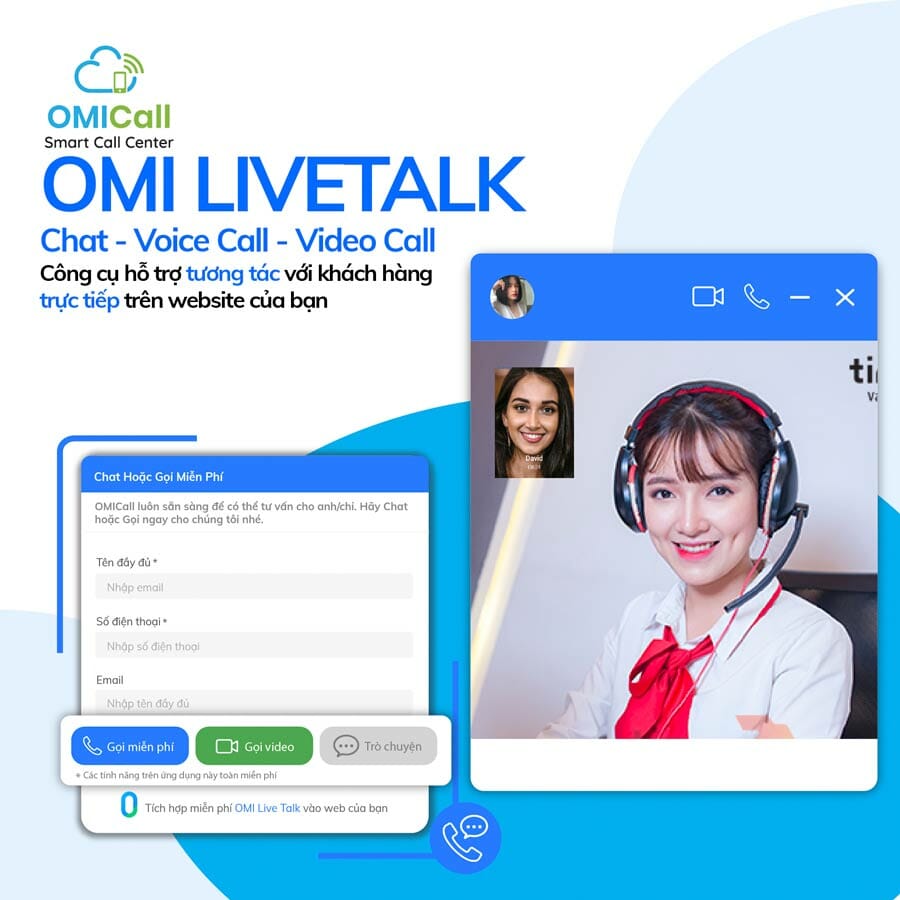
Live Talk is a messaging widget (similar to a Live Chat button) embedded on a website interface, upgraded with multiple interaction options including online chat, audio calls, video calls, and a built-in customer storage system that captures data immediately after each interaction.
What makes it especially powerful is the integrated Video Call feature — when customers want to see a product or service in action, video consultation becomes simpler than ever, helping agents better understand customer needs and psychology, increasing persuasiveness and boosting order conversion rates. Live Talk is the fastest tool for connecting, advising, and supporting customers while effectively driving sales growth.
Many more advanced features are also on the way. OMICall continuously upgrades its features and quality to deliver the best experience for businesses — at just 30,000 VND per agent per month. All customer care operations run smoothly, staff performance improves, call costs drop significantly, saving over 50% compared to traditional PBX systems, and most importantly, it “increases customer satisfaction for your business.”
Ticket Management A ticket is a support request related to a customer issue, a service/help request, or a task assigned by a manager to a team member. The ticketing system helps businesses record and track the resolution process for both customer and internal staff issues.
Zalo ZNS (Automated Customer Care Messaging via Zalo OA) ZNS is a feature within the OMICall virtual PBX system — an API-based automated messaging service for customer care on Zalo, with no need to actively monitor a Zalo OA account beforehand.
How Virtual PBX Software Works
The virtual PBX service operates entirely over the Internet, transmitting voice and data through the network rather than traditional phone lines — making it simple and straightforward to use. The cloud PBX can run on multiple devices including PCs, mobile phones, and IP phones. OMICall also currently supports live video call functionality, similar to what Facebook and Zalo offer.

Steps to Register and Set Up a Virtual PBX for Your Business
Step 1: Register your business information at: https://sso.omicrm.io/register
Step 2: Activate your account and complete your profile via the confirmation email sent to your inbox.
Step 3: Choose your preferred PBX number. Businesses need to register a SIP number provided by various carriers such as FPT, Viettel, CMC, and others. Available number formats include 1900, 1800, 028xx, 024xx, 0236xx, and mobile SIP numbers starting with 09xxx.
OMICall offers an exclusive collection of premium “lucky” numbers — including quad-matching and triple-flower combinations — for businesses to choose from. These numbers support unlimited simultaneous calls across multiple devices such as mobile phones, IP phones, and laptops, with call rates identical to standard phone calls.
Step 4: Complete the contract registration process in just 30 minutes.
To help businesses get started, OMICall has put together a detailed step-by-step video covering everything from a live call demo and PBX installation to connecting internal extensions — check out the tutorial video below!
Comparing Virtual PBX with Analog PBX
Businesses are not hesitant to switch from a traditional phone system to installing a virtual PBX, as long as they have a reason to do so. That’s why OMICall will compare these two systems, so businesses can find their own reasons to embrace this technological era!
| VIRTUAL PBX Connected via Internet Cloud computing infrastructure No initial material costs Supports diverse endpoint devices Reduces call charges by over 60% No IT technicians required to operate Many advanced features Easy to scale and relocate Unlimited simultaneous calls Displays incoming caller name Easy to change greeting messages No maintenance or repair costs Can store large call recordings Internal communication anywhere in the world Has its own CRM management system Not affected by power outages, fires, etc. | ANALOG PBX Connected via Analog line Analog system infrastructure Very high initial material costs Only supports desk phones Very high call charges Requires many IT technicians to operate Only supports basic call features Very difficult to relocate due to analog wiring Limited simultaneous calls Cannot display incoming caller name Difficult to change greeting messages Very high maintenance costs No call recording storage, or very small recording files Can only communicate where connected No management system Prone to analog line cuts and connection loss |
OMICall Virtual PBX Service Pricing
The virtual PBX service price will depend on the number of employees (extensions) using the system for calls, with all the features mentioned above included. Below are the specific pricing plans for businesses:

Virtual PBX Pricing Table
Real-World Case Study of Virtual PBX Implementation
Applying the OMICall virtual PBX system at a brand message marketing company (SMS Brandname) in the Hanoi branch to manage 10 salesmen working remotely. Working hours are from 8:00 AM to 5:30 PM. Near the end of each workday, during the last 15 minutes at 5:15 PM, the salesmen will create a to-do list for the following day so that management can clearly track their schedules and tasks. For example:
Calling back existing clients X, Y, Z to provide further service consultation, etc.
Meeting clients A, B, C at location…
Making 10 telesales calls to pitch products
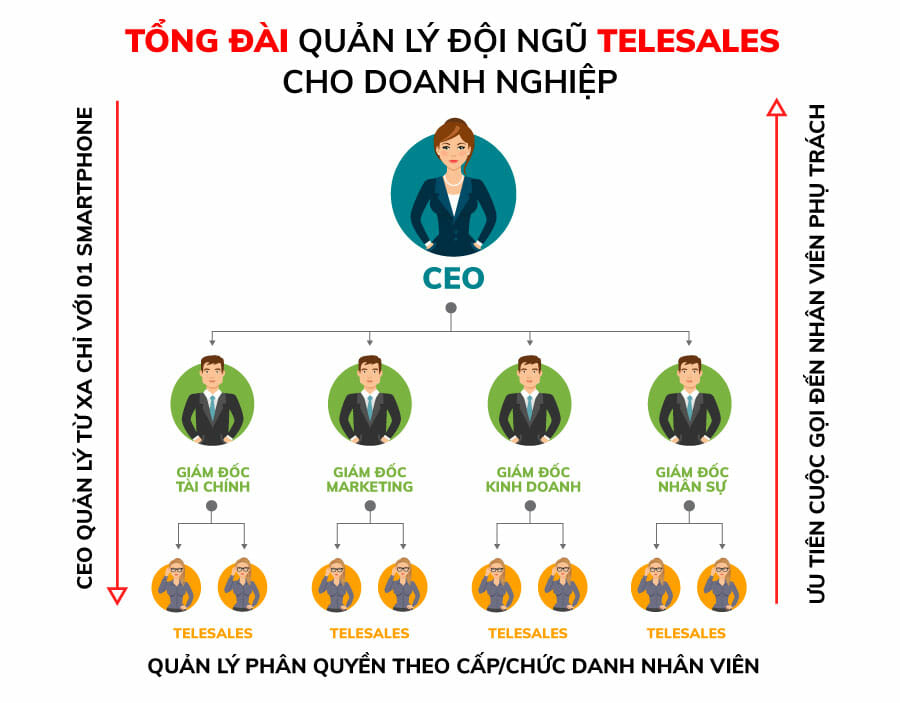
Using Trello to manage the to-do list of each salesperson (each salesperson will write out 3–5 important tasks for the day to complete), which both helps management stay on top of progress and gives salesmen daily goals to work toward.
Connecting the website form system’s APIs with OMICall’s CRM — when leads flow into the system, it will automatically assign customers to salespeople according to the scenario set up by the business owner, then send the allocated customer information to the salesperson’s email, after which the salesperson will follow up and call customers directly through the OMICall system.
Every call is stored and recorded, allowing sales managers to listen back — enabling them to evaluate sales quality as well as customer care quality.
All outgoing and incoming calls made by salespeople are managed within the system, and the director simply needs to maintain close oversight and spend a little time at the end of the day reviewing and listening to calls to effectively manage their sales team.
This process requires discipline, serious commitment, and a high-speed internet connection to ensure the system operates at its best.
Top Best Virtual PBX Providers Today
There are currently many different virtual PBX service providers on the market. However, the one that has been highly rated and received positive feedback from businesses for its quality is OMICall’s virtual PBX service.
OMICall provides an ecosystem of many different service solutions such as voice calls, email, SMS brandname, mobile app, and more — creating the most optimized and simplest 4.0 solution suite available. Among these, the virtual PBX system is the perfect combination of calling features designed to increase customer satisfaction.
OMICall always listens and continuously improves service quality to bring the greatest convenience to customers. As such, we constantly upgrade features based on customer needs — customers are welcome to suggest new functions they require, and we will develop additional features accordingly.
- Free support for businesses in selecting attractive virtual PBX numbers, including premium number patterns such as repeating digits, triple flowers, feng shui numbers, and more
- Fast installation and deployment within just 1–2 working days
- Customers can especially enjoy a free 30-day trial before making a decision! With the motto of wholehearted dedication and support: “Your growth is OMICall’s growth” — we will always accompany businesses on their journey.
The information above has helped explain what a virtual PBX service is. It is clear that choosing a cloud-based PBX is the trend among businesses looking to build a professional, convenient, and cost-optimized system. If you are interested in registering for OMICall’s service, you can visit any of our nationwide offices directly for consultation and support.
VIHAT TECHNOLOGY Co., Ltd
Headquarters: ViHAT Building – 06 Street No. 16 (Him Lam Residential Area) – Hiep Binh Chanh Ward – Thu Duc District – Ho Chi Minh City
Hanoi Branch: Floor 15, LADECO Building, 266 Doi Can, Ba Dinh, Hanoi
Cambodia Branch: Thida Rath #154 St. 33MC, Sangkat Steung Meanchey, Khan Mean Chey, Phnom Penh

-
 What is TikTok advertising? Advertising policies and how it works.
-
 Exploring Conceptual Selling – Understanding Modern Sales Trends Correctly
-
 What is a KOC? Distinguishing between KOLs and KOCs.
-
 What Are Customer Insights? Revealing How to Effectively Uncover Them
-
 What is Digital Marketing? 10 Effective Forms of Digital Marketing
-
 What is Online Marketing? Types of Online Marketing